
I’ve lost count of how many times I’ve been researching something—say, a decent coffee maker for a small apartment—and ended up with seventeen tabs open, half of them irrelevant, and no memory of what I was originally looking for. That’s the classic web browsing experience in 2026: tab hopping until your brain gives up.
Google thinks it has a fix, and honestly, it might actually work. They’ve been rolling out AI Mode in Chrome for a while now, but the latest updates change the game in a couple of meaningful ways. No more switching back and forth between search results and actual pages. No more losing context because you clicked a link and forgot why.
Side-by-side browsing that doesn’t suck
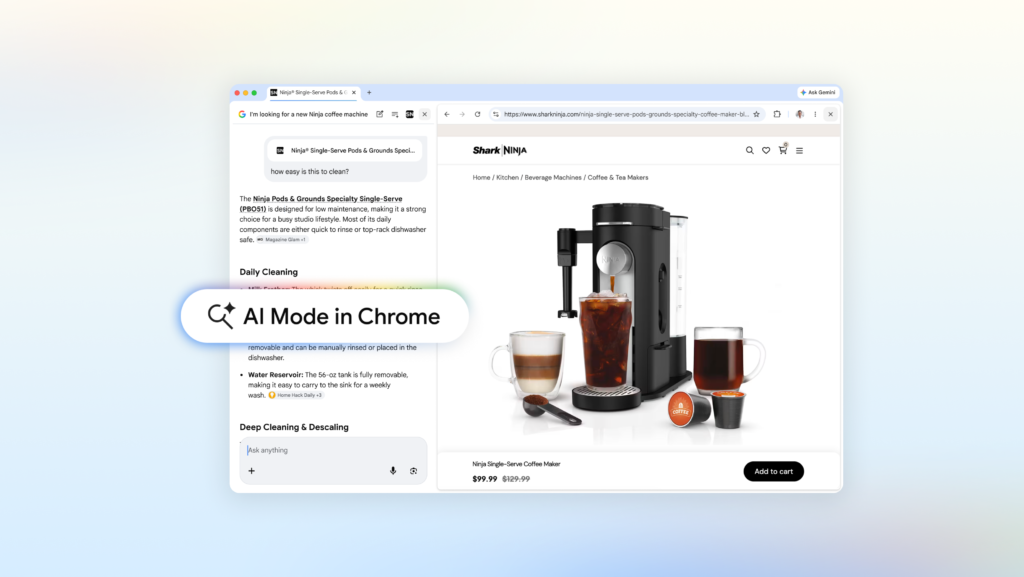
The headline feature is this: when you click a link in AI Mode on Chrome desktop, the webpage opens right next to your search panel. You’re not leaving the AI conversation behind. You can keep asking questions, and the AI still has the context of your original query plus whatever’s on the page you’re looking at.
Let’s say you’re hunting for a coffee maker. You type something like “compact espresso machine for a tiny kitchen” into AI Mode. It gives you a few options. You click one link—say, a retailer page for a Breville model—and instead of that page taking over your whole browser, it slides in next to your search. You can then ask, “How easy is the drip tray to clean?” and AI Mode pulls context from both the product page and the broader web to give you a real answer. No tab switching, no re-typing your question.
I tried this with a more niche topic: McLaren Racing pit crew training methods. Opened the official McLaren site alongside AI Mode, asked follow-ups about how their pit stops differ from Formula 1 teams, and it worked. I didn’t have to jump back to Google to rephrase anything. The flow felt natural, which is rare for AI search tools.
Early testers apparently felt the same way. Google says people reported staying more focused and spending less time juggling tabs. That matches my experience—when you don’t have to constantly rebuild context, you actually get more done.
Search across your tabs, images, and PDFs
Here’s another feature I didn’t expect to use as much as I do: you can now search across the Chrome tabs you already have open. On desktop or mobile, there’s a new “plus” menu in the search box on the New Tab page (or inside AI Mode itself). You can select recent tabs, images, or even PDFs and throw them into your AI Mode query.
Imagine you’re researching hiking trails. You’ve got three tabs open with different trail guides. Instead of manually comparing them, you add those tabs to your AI Mode search and ask, “Find similar kid-friendly trails near Portland.” The AI reads through all those pages and gives you recommendations based on the combined context. It’s not perfect—sometimes it misses a subtle detail—but it’s way faster than doing it yourself.
Or if you’re studying for a stats midterm (good luck with that), you can dump your class notes PDF, lecture slides, and a couple of academic papers into the search. Ask for more examples of a tricky concept, and AI Mode tailors the response to what’s actually in your materials. It even suggests new sites to explore based on gaps it detects.
This is the kind of feature that sounds gimmicky on paper but saves real time once you try it. The ability to mix tabs, images, and files into one query is genuinely useful, especially for research-heavy tasks.
The tools you already know, now in Chrome
Google also mentions that Canvas and image creation are accessible within AI Mode. I haven’t played with those as much, but they’re there if you need to visualize something or sketch out ideas without leaving the browser. It’s nice to have, but not the main draw.
What matters more is that AI Mode is getting smarter about following your train of thought. It remembers what you were looking for even after you click away to read a page. That’s the kind of basic usability that search has been missing for years.
Is it worth using?
If you’re already on Chrome and you do any kind of multi-step research—shopping, planning, studying, comparing—AI Mode is worth turning on. It’s not perfect. Sometimes the side-by-side layout feels a bit cramped on smaller screens, and the AI can still hallucinate details if you push it too far. But compared to the old tab-hopping nightmare, this is a clear step forward.
Google’s been pushing AI into everything, and most of it feels like noise. This one doesn’t. It actually solves a real problem: the friction of moving between search and content. I’ll take that over another chatbot that writes poems any day.
Comments (0)
Login Log in to comment.
Be the first to comment!